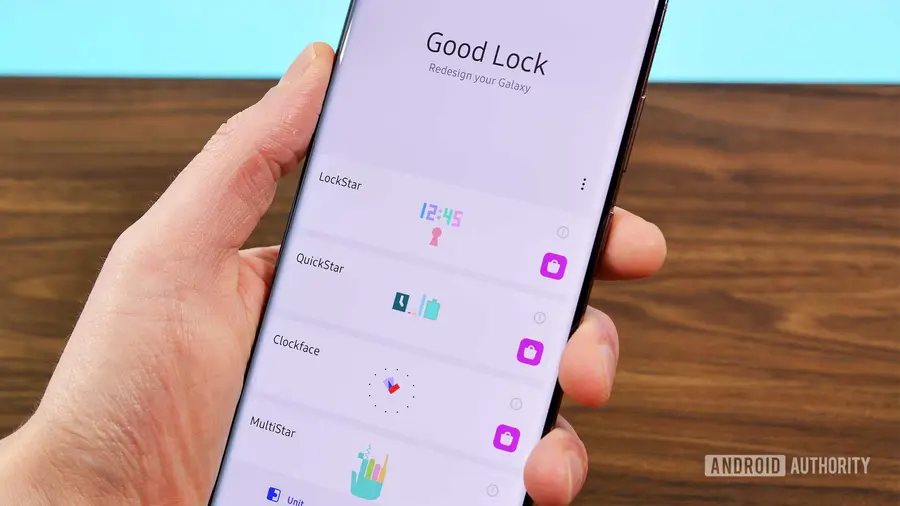
Samsung's One UI is packed with features, but it may not include everything you need out of the box. One way to enhance your Galaxy phone is through Good Lock modules, which offer fantastic customization options without overwhelming users. Below, we explore ten Good Lock features that truly stand out and deserve a spot in One UI.
Per-App Screen Timeout with Display Assistant
Sometimes, the default screen timeout setting isn't practical for every situation. The Display Assistant module allows you to customize the screen timeout for individual apps. For example, while a 30-second timeout may be sufficient for texting, it can be frustrating when reading longer content like recipes or articles. With Display Assistant, you can extend the timeout for specific apps like your PDF viewer or web browser, enhancing your user experience significantly.
Tailored App Volume Control
Managing sound levels across different applications can be a hassle. The Sound Assistant feature addresses this by enabling you to adjust the volume for each app separately. If you enjoy listening to music at a high volume but prefer lower levels for video playback, you can set your preferences for each app. This feature is particularly beneficial for gaming, streaming, and messaging apps, allowing for a more tailored audio experience.
Gesture Controls with RegiStar
iPhone and Pixel users have enjoyed the convenience of Back Tap for some time, and now Galaxy users can join in thanks to Good Lock’s RegiStar module. This feature transforms the back of your phone into a customizable button. You can set it to perform various actions, such as launching specific apps or capturing screenshots. Furthermore, you can even navigate to certain sections within apps, making your device more intuitive and personalized.
Customizable Status Bar with QuickStar
The status bar provides essential information, but not all icons are useful for every user. QuickStar lets you hide unwanted status bar icons, decluttering your view. Additionally, on One UI 9, it includes a network speed indicator, ideal for those who want to keep track of their internet performance. This simple customization can make a significant difference in how you interact with your device.
Enhanced Button Actions with Routines+
Your Galaxy phone's physical buttons can do much more than control volume. With Routines+, you can assign specific actions to long-press and double-press gestures on these buttons. This feature allows you to create shortcuts for launching apps, sending messages, or even navigating to your favorite locations, adding a layer of convenience to your daily tasks.
Improved Navigation with Home Up
Switching between apps can become cumbersome, especially if you frequently use the recents menu. Home Up addresses this by offering layout options for the Task Changer, allowing you to choose between a grid, vertical list, or slim list view. This means you can see more apps at once, speeding up your navigation and making multitasking easier.
Streamlined Sharing with Share Manager
Android's share sheet is a useful tool, but it can become cluttered. Home Up’s Share Manager allows you to pin your favorite contacts and apps for quick access, as well as hide those you don’t use. This customization keeps your share sheet organized, making sharing content more efficient.
Gallery Assistant for Efficient Photo Editing
Editing multiple photos at once can be tedious, but Good Lock's Gallery Assistant simplifies this process. With this module, you can rotate, resize, and watermark up to 500 images simultaneously. Additionally, it offers a feature to reduce the size of photos without deleting them, making it an invaluable tool for those who frequently manage their media.
LockStar for Customized Lock Screens
While One UI provides basic lock screen personalization, LockStar takes it a step further. You can add app shortcuts, emojis, stickers, and custom text to your lock screen, allowing for a unique touch that reflects your style. This feature also extends to the Always-On Display, giving your lock screen added functionality beyond aesthetics.
Camera Assistant for Enhanced Photography
Exclusive to the Galaxy S26 and Z Fold 8, Camera Assistant introduces a hidden 24MP mode that utilizes AI Fusion processing. This feature offers a balance between high resolution and manageable file sizes, ensuring you can capture stunning images without overwhelming your storage. It’s a significant advancement for photography enthusiasts looking for quality without compromise.
In conclusion, these ten Good Lock modules enhance the Samsung Galaxy experience by offering customization and improved functionality. While One UI is already feature-rich, integrating these modules can make your device even more user-friendly. Have you found any Good Lock features that you can’t live without? Share your favorites in the comments below.
Source: https://www.androidauthority.com/best-samsung-good-lock-modules-2026-3712342/