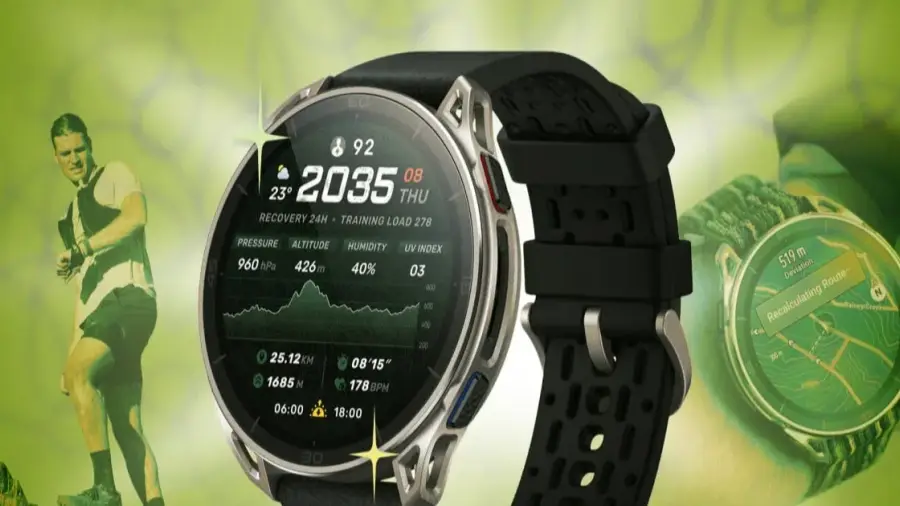
The Amazfit Cheetah 2 Ultra is a premium trail running watch crafted from titanium and sapphire, priced at $599.99, approximately IDR 9.7 million. While this price point is higher than what Amazfit typically offers, the watch provides an upscale option for runners seeking a high-quality device with a luxurious feel.
Unlocking Developer Mode
Similar to its predecessor, the Cheetah 2 Pro, the Amazfit Cheetah 2 Ultra is packed with features that may not be immediately evident. One hidden gem is the secret menu in the Zepp app. To access it, navigate to Profile, then Settings, followed by About, and tap the Zepp logo seven times in succession. This action activates developer mode, granting access to device information and debugging options that are not typically visible to the average user.
While developer mode doesn't unveil any hidden hardware, it can be helpful for checking firmware details or troubleshooting persistent syncing issues. For those who enjoy exploring, this mode offers an intriguing way to tweak your device.
Custom Watch Faces
In developer mode, you can also install custom watch faces. Rather than relying solely on the built-in library, users can upload their preferred designs from a computer, scan the generated QR code, and install them directly on the watch.
Understanding Elevation Profiles
If you're planning a route with significant elevation changes, the Amazfit Cheetah 2 Ultra has a fantastic feature for you. The watch includes an elevation summary tool that color codes the difficulty levels of climbs along your route. Instead of guessing based on raw elevation profiles, you get a clear visual representation of where the terrain becomes steep.
This feature might be overlooked by casual runners, but it's essential to check it before starting any trail run. Knowing what challenges lie ahead can significantly enhance your experience.
To view the color-coded elevation profile while running, add elevation as a data screen. Select Workout on the watch, choose an activity like Outdoor Running, enter Settings > More > Data Page, and tap on the data field to display the elevation information.
Advanced Flashlight Features
Many users appreciate the built-in flashlight on their Cheetah 2 Ultra, but it offers more than just a single beam. The flashlight features multiple modes, including white, red, SOS, and boost. The boost mode is ideal for maximum brightness, perfect for navigating dark trails, while the SOS mode emits a clear flashing signal for safety.
Switch between modes by pressing the button multiple times. After turning on the flashlight by holding down the upper left button, use the UP or DOWN buttons to cycle through brightness settings until you reach the red light mode. Alternatively, swipe down from the watch face to access the Control Center and tap the flashlight icon.
Importing Maps for Remote Locations
While it may seem that map options are limited to what the Amazfit offers or what’s available in the Zepp app store, there’s more you can do. The Cheetah 2 Ultra can function as a mapping tool by allowing you to import OSM (OpenStreetMap) files.
If you’re heading to a remote area not covered by the preloaded map set, you can prepare in advance. Remember, the downloaded maps must align with your actual location for them to be useful. This is a trick that requires prior planning rather than a last-minute fix during your adventure.
Storing Music for Your Runs
Although the Cheetah 2 Ultra does not support direct downloads from streaming services like Spotify or Amazon Music, you can manually load MP3 files onto the watch. With double the storage capacity of the Pro model at 64GB, there’s ample space for your running routes, offline maps, and music files.
This manual loading step may be more involved than simple streaming synchronization, but it’s beneficial for runners who prefer to go without their phones during long distances. To upload music, access the Amazfit Cheetah 2 Ultra device page in the Zepp app, select “Music,” and choose the .mp3 files from your phone to transfer to the watch.
The Amazfit Cheetah 2 Ultra, priced at $599.99, represents a solid value for runners looking for a premium device. With its titanium and sapphire construction, it stands out, while its hidden features enhance its functionality beyond that of a standard sports watch.
For serious trail runners, the color-coded elevation feature and OSM map support are significant advantages. Additionally, for those who enjoy customization, developer mode and custom watch faces provide extensive personalization options.
With 64GB of storage, the watch offers ample space for various offline needs, setting it apart from the Pro series. All these features make the Cheetah 2 Ultra an attractive option in the premium running watch segment, despite its higher price compared to other Amazfit products.
Source: https://telset.id/how-to/5-fitur-tersembunyi-amazfit-cheetah-2-ultra-yang-wajib-dicoba