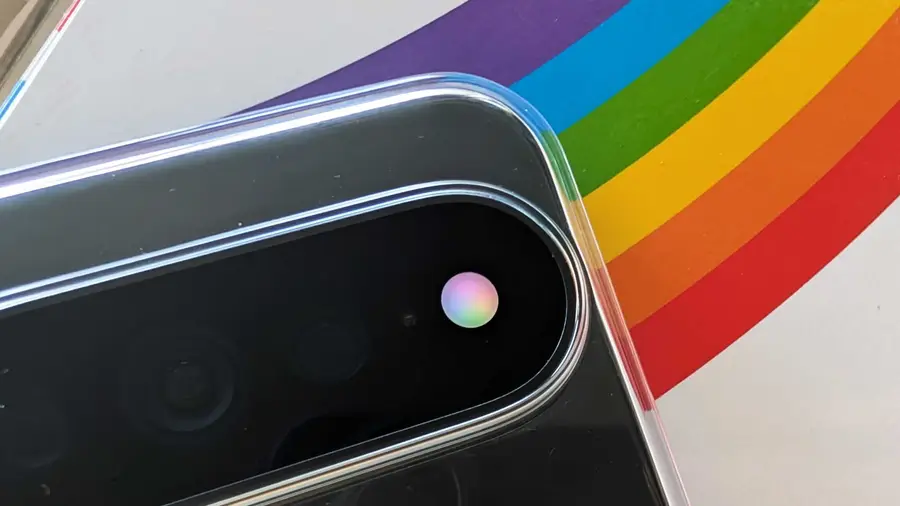
The Pixel 11 Pro series has introduced an innovative HiLight LED system that surrounds the camera’s flash. While this feature offers notifications for favorite contacts and when engaging in Gemini conversations, many users find its initial functionality lacking. Fortunately, for those willing to take matters into their own hands, the open-source HiLight Studio app enhances the HiLight experience significantly.
What is HiLight Studio?
Created by Dhananjay Bhosale, a YouTuber and developer, HiLight Studio is an open-source application that opens up a world of customization for the HiLight LED. Unlike its default settings, this app allows users to configure the LED for notifications from any app, expanding its utility far beyond the basic functionality provided by Google.
Customization Options Galore
- Color Selection: Users can set specific colors for different apps, creating a personalized look for notifications.
- Patterns: HiLight Studio offers multiple lighting patterns such as comet, pulse, breathe, wave, and even rainbow effects.
- Presets: If you're overwhelmed by choices, the app allows you to save and share presets, making it easier to manage your settings.
- Wallpaper Integration: For a cohesive aesthetic, users can pull colors from their wallpapers.
Enhanced Control and Safety Features
HiLight Studio not only enhances customization but also provides users with robust control over their HiLight settings. A Quick Settings tile enables easy toggling of features without needing to open the app. Respecting users' Do Not Disturb preferences, the app can also set quiet hours and pause functionality when battery levels drop.
Moreover, to safeguard the LED array, which was not designed for prolonged use, HiLight Studio incorporates built-in limits. The brightness automatically dims if the LED remains active for over 10 seconds, and it will turn off after 30 seconds by default when an app is opened. Users can extend this time up to five minutes, but must acknowledge several warnings.
Installation and User Experience
Installing HiLight Studio involves a few steps, including setting up Shizuku to activate core functionality after each reboot. Users must grant notification and usage access for the app to manage notifications effectively. While the setup can be slightly complex, once completed, the app delivers a range of visual effects and color customization options.
However, some users have reported that after installing HiLight Studio, the default HiLight features, such as notifications for Gemini conversations, stopped functioning correctly. Uninstalling the app seemed to restore the system's original functionality, leaving some users cautious about its compatibility.
Despite these issues, many find HiLight Studio to be a valuable addition to their Pixel 11 Pro experience, offering the kind of flexibility that users feel should have been included from the start. The app is open-source, free of ads, and subscription-free, which adds to its appeal.
In conclusion, HiLight Studio stands out as a powerful tool for those looking to enhance their Pixel 11 Pro’s LED capabilities. With a wealth of customization options and safety measures, it’s a must-try for any Pixel owner eager to unlock the full potential of their device.
Source: https://www.androidauthority.com/google-pixel-11-pro-hilight-studio-3700860/