Using an Android phone is a delightful experience, especially with the vast array of apps available to assist with various tasks, from image editing to document management. However, juggling numerous single-purpose applications can quickly become impractical, leading to wasted storage and constant updates. Fortunately, there's a solution that simplifies this problem: Image Toolbox.
What is Image Toolbox?
Image Toolbox is a comprehensive, open-source application designed to consolidate multiple media-related tools into one convenient platform. This free app stands out because it is devoid of ads, making it a user-friendly option for anyone looking to streamline their mobile experience.
User-Friendly Interface
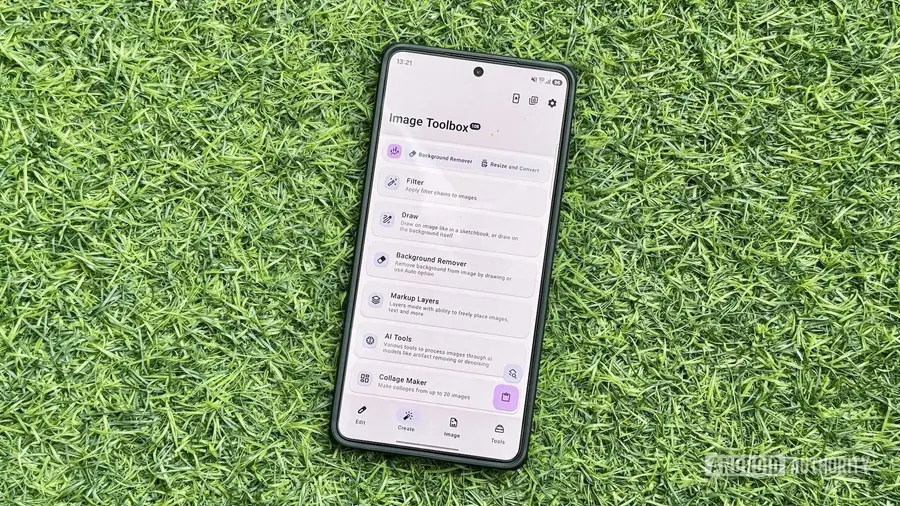
The app boasts a sleek and responsive interface that is easy to navigate. It features four main tabs located in the bottom navigation bar: Edit, Create, Image, and Tools. Each tab is dedicated to specific functionalities, ensuring that users can find what they need without hassle.
- Edit: This tab hosts a variety of editing tools, including Resize and Convert, Crop, and Format Conversion.
- Create: Here, users can access tools for creating new media.
- Image: This section deals with various image-related operations.
- Tools: This tab includes additional media tools, such as Document Scanner and GIF Tools.
Powerful Features
Image Toolbox has transformed the way I handle media tasks on my Android device. No longer do I feel the need to download separate apps for each function. Here are some standout features:
- Image Resizer and Converter: The Resize and Convert tool allows for easy image resizing and format conversion, offering options for compression and batch processing.
- EXIF Remover: With the Delete EXIF tool, users can effortlessly remove metadata from their images, with options for selective deletion and bulk processing.
- Background Remover: This tool offers both automatic and manual background removal options, ensuring versatility for users.
- PDF Editor: The PDF Tools feature allows for comprehensive editing, including merging and compressing PDFs, as well as password protection.
- Image Stitcher: Easily stitch images together, perfect for creating long screenshots or collages.
- GIF Creator: Convert images into GIFs with ease using the collection of GIF tools available.
- QR Code Generator: Create personalized QR codes with a variety of templates.
- Collage Maker: Design beautiful collages effortlessly with the help of automatic templates.
Customizable Settings
Image Toolbox offers extensive customization options. Users can change the app's theme, rearrange tool layouts, and adjust the default save locations to suit their preferences. For instance, enabling the Launcher Mode displays tools like app icons for quicker access. Additionally, the Search feature adds a floating button, making it simple to locate specific tools.
Before diving into my editing tasks, I typically adjust several settings. I prefer having edited files saved alongside their originals, so I enable the Save to Original Folder option. Furthermore, I modify the naming convention for edited files, adding “image-toolbox” to the suffix for easy identification.
Final Thoughts
After using Image Toolbox regularly, I can confidently say it has eliminated the need for many individual apps I used to rely on. Its robust set of tools, coupled with a straightforward interface, makes it an essential app for anyone looking to optimize their media handling on Android. Whether you need to resize images, edit PDFs, or create GIFs, Image Toolbox has you covered.
Source: https://www.androidauthority.com/image-toolbox-android-app-hands-on-3699127/