With the recent advancements in health technology, Apple is set to revamp its Health app, aiming to win back users who may have been lured by Google Health's offerings. After a decade of using the Apple Watch, I recently explored the revamped Apple Health app in the iOS 27.2 developer beta and was impressed by its potential.
Transition from Google Health to Apple Health
My journey with health apps began with a Fitbit Charge HR, before I transitioned to an Apple Watch Sport in 2015. However, the landscape has shifted dramatically since Google acquired Fitbit and revamped its health platform. My recent switch back to Apple comes as they announce an upcoming AI-enhanced version of their Health app.
New Features and Insights
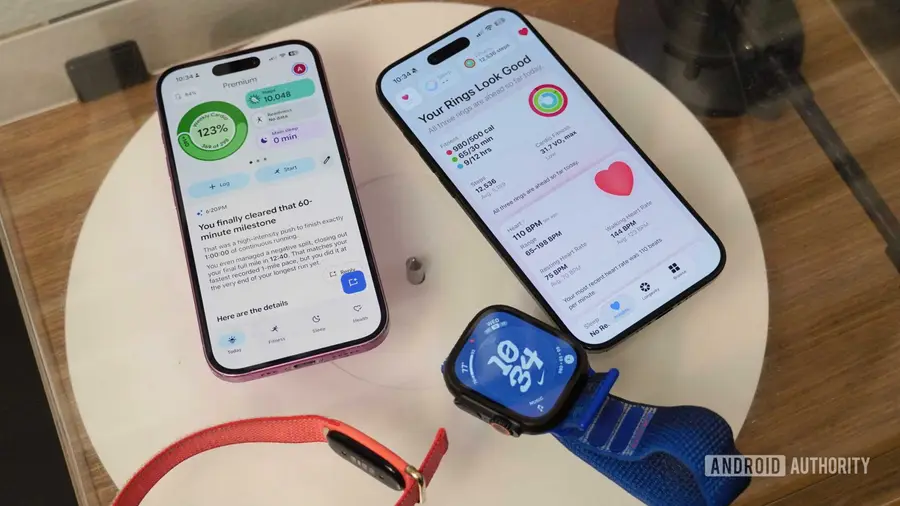
The redesigned Apple Health app introduces a fresh Insights tab that prominently features Activity Ring data, simplifying the user experience. Previously, users had to switch between the Fitness and Health apps to view their metrics, making the process cumbersome. The new Longevity tab is another highlight, offering an estimate of your health age based on fitness data captured by your Apple Watch.
What sets Apple Health apart is its ability to perform personalized tests using the Apple Watch and iPhone's camera, allowing for a more precise health age evaluation. A standout feature is the VO2 max test, which measures maximum oxygen intake during intense exercise—something that Google Health currently lacks.
Compatibility Concerns
However, not all users will benefit from these new features. The redesigned app is available only for newer iPhone models, specifically the iPhone 15 Pro, Pro Max, or later versions. Users with older iPhones will have to stick with the existing version of the Apple Health app, a significant limitation compared to Google Health, which is accessible on devices running Android 11 or iOS 16.4.
Readiness Score and Hardware Limitations
Another new feature, the readiness score, assesses your body's preparedness for daily activities and workouts, using a scale from zero to ten. Unfortunately, this feature is only compatible with the latest Apple Watch Series 12 or Ultra 4, leaving many users, including myself with an Apple Watch Ultra 3, unable to access it. This could set a worrying precedent for future upgrades.
The readiness score relies on sophisticated hardware, including new heart rate sensors and the upgraded S11 chip, which my current watch does not possess. Despite these limitations, the new Apple Health app’s data-driven approach is evident, as it utilizes AI to deliver concise summaries of user metrics.
Comparing Apple Health and Google Health
When comparing the two apps, the differences in their design and functionality become apparent. Google Health employs a chatty AI assistant known as the Google Health Coach, which provides extensive summaries and action items based on your data. However, this can often lead to information overload, particularly when the app emphasizes mundane reminders instead of insightful metrics.
Conversely, the new Apple Health app prioritizes clarity and essential information, focusing on overarching trends rather than verbose commentary. This approach resonates with users seeking straightforward health data interpretation. My experience with both platforms has led me to appreciate Apple’s empirical methodology over Google’s conversational approach.
Conclusion
As I delve deeper into the new Apple Health app, I remain optimistic about its potential to reshape the health app landscape. While Google Health has made strides in device inclusivity, it may be at the cost of accuracy and clarity. Apple’s selective approach to hardware compatibility could ultimately provide a more refined and effective health monitoring experience.
Source: https://www.androidauthority.com/apple-google-health-redesign-3712230/