Managing Multiple Google Accounts Easily on Android
For many users, having more than one Google account is common. We often have to deal with work, school, and several personal accounts. If you also find it difficult to manage multiple Google accounts on your Android phone, you are not alone. Fortunately, there is an easier way to switch between accounts without wasting valuable time.
Experience Using Multiple Google Accounts
For over a decade, I have been accustomed to using more than one Google account. Initially, I had an account for education which later switched to a work account. Often, I also have several personal accounts for various purposes such as Google Authenticator, personal email, and Google Home data. However, switching between these accounts often became a tedious and time-consuming task.
The Time-Consuming Traditional Method
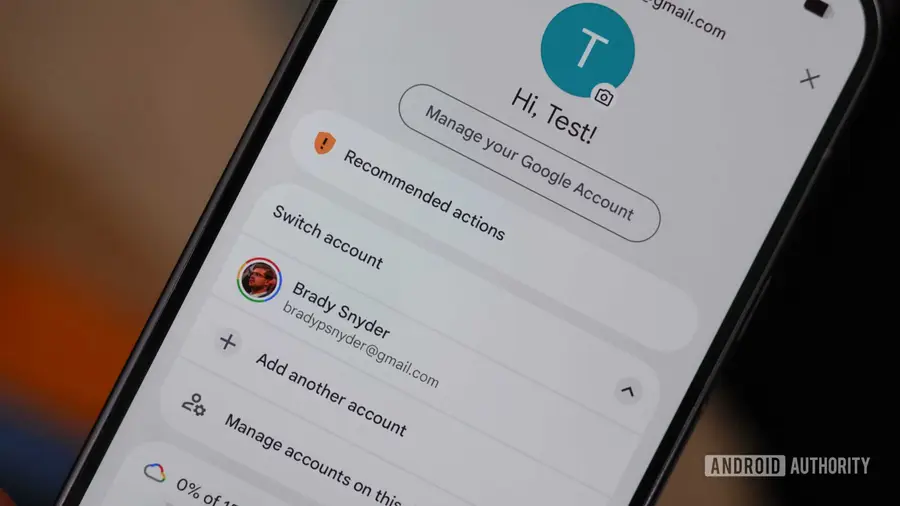
Before discovering a more efficient way, I usually switched accounts the old-fashioned way: tapping the Google profile picture, pressing the "Switch account" button, and selecting the desired account. Although it seems trivial, this method clearly wastes time and can be quite annoying, especially if you have to do it multiple times a day.
Simple Gestures to Switch Accounts
Fortunately, there is a simpler way to change Google accounts. You just need to tap your small profile picture and swipe up or down. This way, you can quickly switch between active accounts on your Android phone without opening a new page. If you have an Android Work Profile, you can also swipe left or right to switch between your work account and other Google accounts.
- Gmail: I found this gesture very useful when checking incoming messages without losing focus.
- Google Maps and Google Photos: You can also use this gesture while using other apps within the Google ecosystem.
- Google Drive and Google Meet: This gesture works across various apps, making account management smoother.
Why Is This Gesture Important?
Although this feature does not solve all problems related to using multiple accounts, it is very helpful in saving time. By knowing and utilizing this gesture, you can reduce stress and increase productivity when using various Google applications. Google still needs to continue working on making multi-account use easier on Android devices, but this step is a good start.
So, if you often deal with multiple Google accounts, don't hesitate to try this gesture. You might be surprised how easy it is to manage your accounts with just a few finger taps.
Source: https://www.androidauthority.com/google-account-switcher-gesture-3678847/