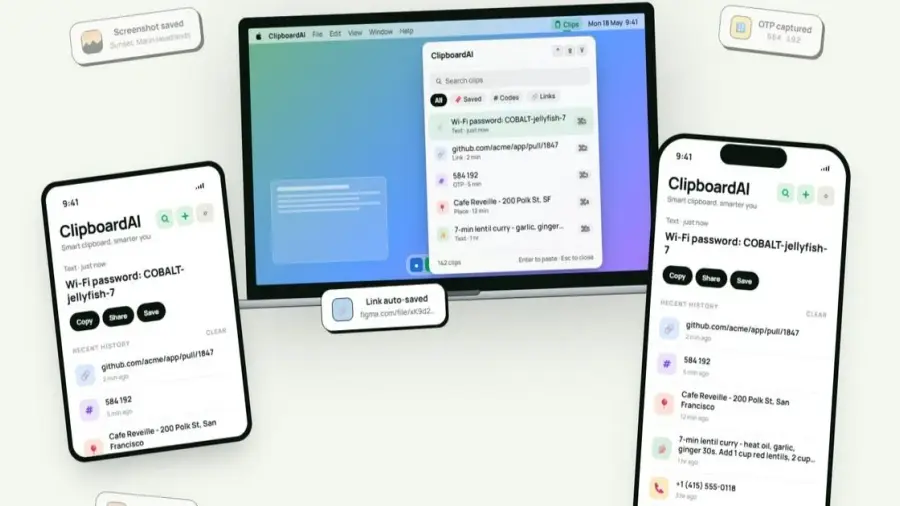
In today's fast-paced digital world, keeping track of copied texts, links, or codes can be challenging. ClipboardAI emerges as a robust solution for users who frequently misplace or lose their copied items. Unlike the default Apple clipboard, which only retains the most recent copy, ClipboardAI offers an extensive history of your clipboard activities that can be easily searched.
Features of ClipboardAI
ClipboardAI not only stores your copied content but does so in a way that is beneficial for users across their iPhone, iPad, and Mac devices. This means that your previous clips are preserved, even as you add new ones. The application uses artificial intelligence to organize copied items into distinct categories such as links, code snippets, emails, addresses, phone numbers, plain text, and images.
Creating Collections for Easy Access
Another impressive feature of ClipboardAI is the ability to create collections for frequently used materials. Whether it’s research links, templates, travel details, or snippets of text, users can keep everything organized and easily accessible. This functionality enhances productivity by allowing quick access to commonly referenced resources without the need to search through all clipboard entries.
Keyboard Extension for Seamless Use
The keyboard extension feature is particularly useful, allowing users to view up to 20 of their most recent clips while typing in any iOS text field. This means you can quickly paste previously copied content in apps like Messages, Mail, Slack, or Safari without switching between applications.
Privacy and Security Features
As clipboard contents often include sensitive information such as passwords, email addresses, and personal details, ClipboardAI prioritizes user privacy. The application retains its AI functionalities on-device, storing clips locally with SwiftData, and avoids using analytics, advertisements, or third-party SDKs. Furthermore, it treats sensitive information differently by automatically obscuring it. Passwords, for instance, can be set to disappear after 60 seconds, ensuring that your sensitive data remains secure.
Subscription Options and Functionality
ClipboardAI offers a free version that includes automatic capturing, categorization, search functionality, and the ability to save up to 10 clips. For users who require more, the Pro version provides unlimited clip storage, iCloud synchronization, keyboard extension capabilities, advanced AI features, and the option to create collections. A 7-day trial is available, along with a one-time purchase option of $24.99 for lifetime access.
While not everyone may find a clipboard manager necessary, those who frequently misplace copied links, codes, or notes will find ClipboardAI to be an invaluable tool that enhances their productivity and organization.
Source: https://telset.id/how-to/clipboardai-aplikasi-manajemen-clipboard-dengan-ai-untuk-ios-dan-macos