Setting up a new Android phone often involves downloading a variety of apps, some essential and others focused on productivity. Among these, one app stands out for its utility: Action Notch. This free application enhances how users interact with the camera notch on their devices, turning it into a functional tool for quick actions.
What is Action Notch?
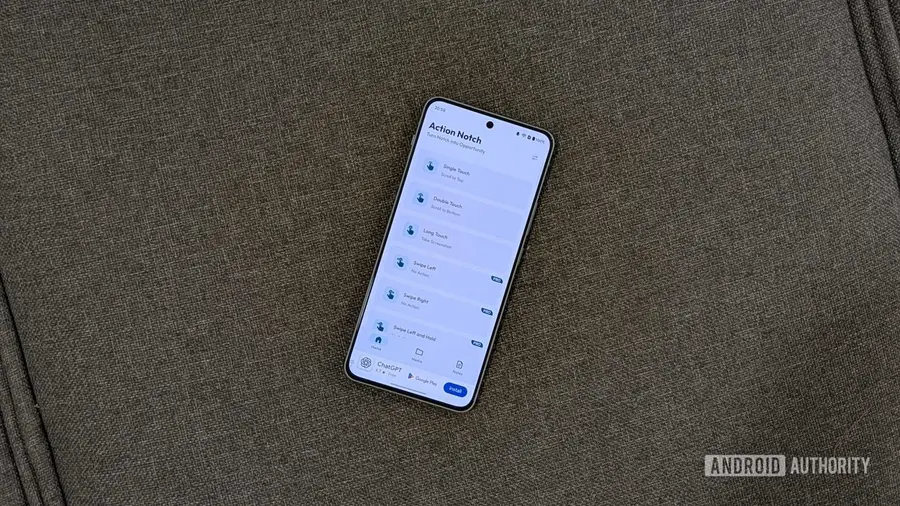
Action Notch is designed for modern Android phones that feature a camera cutout, commonly known as a notch. This app allows users to convert the notch into a virtual button, enabling various gestures, such as tapping or swiping, to execute everyday tasks. For instance, a simple tap on the notch can be configured to take a screenshot, showcasing the app's versatility.
Customizable Gestures and Actions
One of the standout features of Action Notch is its support for multiple gestures. Users can set up single taps, double taps, and long presses, each capable of triggering different actions. With over 50 options available, users can customize their experience, choosing from basic functions like toggling a flashlight to more complex actions involving automation tools like Tasker or MacroDroid.
Upgrading for More Features
While the free version of Action Notch offers a range of functionalities, upgrading to the pro version unlocks additional gestures and the ability to create rule-based actions. This feature allows a single gesture to perform different tasks depending on the context, adding a layer of personalization that enhances the user experience.
Setting Up Action Notch
Installing Action Notch is straightforward. After downloading it from the Play Store, users will go through a quick setup process to grant necessary permissions. The app provides a list of available gestures that can be easily configured. For instance, users can assign a single tap on the notch to perform a scroll to the top action, mimicking a feature commonly found on iPhones.
In addition to gesture configuration, users can adjust the app’s behavior, such as using the entire status bar instead of just the notch. Features like disabling the app during calls or on the lock screen help prevent accidental triggers, ensuring a smooth experience. Users can also create a blacklist for specific apps to avoid interference with configured gestures.
Conclusion
Overall, Action Notch significantly enhances the functionality of Android devices by allowing users to perform various tasks effortlessly. Despite some ads in the free version, the app remains a valuable tool for many Android users. For those who haven’t yet tried Action Notch, now is the ideal time to incorporate this handy application into your routine.
Source: https://www.androidauthority.com/action-notch-android-phone-camera-notch-shortcut-hands-on-3706976/