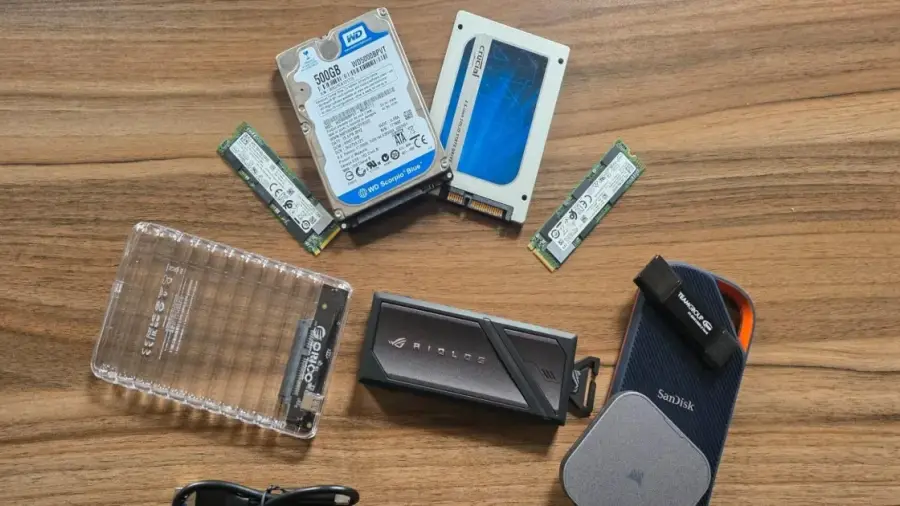
As the demand for external SSDs and flash drives surges, driven largely by AI advancements, many are left with outdated hard drives or SSDs collecting dust. Rather than letting these devices go to waste, you can convert them into functional external storage by simply purchasing a budget-friendly enclosure, often priced under Rp 150,000.
Many PC or laptop users tend to keep old components after upgrading their boot drives. However, devices like SATA SSDs, M.2 drives from older laptops, or even traditional hard drives can still be quite useful. By using a suitable SSD or hard drive enclosure, you can create a portable storage solution without breaking the bank.
Easy Process to Convert Drives
The conversion process is remarkably straightforward. In many instances, you won't even need a screwdriver. Just open the enclosure, insert your old drive, and it's ready to go. The performance of your assembled drive will largely depend on the type of drive and the enclosure you choose. For basic backup needs or transferring a few files, speed may not be a critical issue. Even SATA SSDs provide sufficient speed for everyday tasks.
Considerations for High-Speed Needs
If you require higher speeds, particularly for tasks such as 4K video editing, animation projects, or running local large language models (LLMs), you'll want to look for newer M.2 PCIe 4 or 5 drives. It's also essential to pair these with enclosures that can support the fast bandwidth of your USB-C ports.
Performance Testing Insights
To gauge the performance of older drives, the team at Tom’s Hardware tested several legacy drives in various enclosures. They compared the results against external SSDs and dedicated flash drives to highlight speed differences.
Among the tested drives were the Western Digital WD5000BPVT 2.5-inch hard drive (500GB, from 2011), Samsung 850 Pro 2.5-inch SATA SSD (512GB, from 2014), Intel 660p PCIe 3.0 NVMe SSD (2TB, from 2019), and the modern Gigabyte Aorus 12000 PCIe 5.0 SSD (1TB). The enclosures used ranged from the Orico 2139U3-V1 (5 Gbps) to the OWC Express 1M2 USB4/40Gbps.
Understanding Speed Variations
The testing revealed that the 2.5-inch hard drive performed the slowest, with read/write speeds below 90 MB/s, which is still adequate for incremental backups. In contrast, the Samsung 850 Pro achieved speeds nearly five times faster, reaching under 500 MB/s, suitable for most tasks.
Interestingly, the Intel 660p PCIe 3.0 surpassed 1,000 MB/s in tests, nearing the performance of a 10 Gbps flash drive. When connected to a 20 Gbps enclosure, it almost matched the performance of the pricier Crucial X10. For peak performance, the Gigabyte Aorus in the OWC enclosure exceeded 3,700 MB/s, outperforming the Corsair EX400U in real-world file transfer tests.
In conclusion, older drives can still deliver good speed when housed in the right enclosure. While a hard drive in an enclosure will yield external hard drive speeds, a SATA SSD in a 2.5-inch enclosure can offer 3 to 5 times faster speeds, making it a worthwhile investment for mainstream tasks at an enclosure cost of just Rp 120,000 to Rp 225,000.
If you have a PCIe 3 NVMe M.2 drive, using a 10-20 Gbps enclosure can result in performance close to that of expensive drives. Even when considering the fastest USB4 speeds, assembling your own PCIe 4/5 drive and enclosure for under Rp 1.5 million remains more economical than purchasing a ready-made USB4 drive, which can soar above Rp 9 million.
Ultimately, despite rising component prices, building your own external SSD remains a cost-effective option compared to buying new ones at current prices. Always check the health of your old drives before reusing them to safeguard your valuable data.
Source: https://telset.id/how-to/ubah-hard-drive-dan-ssd-lama-jadi-penyimpanan-eksternal